ScanSnap iX2500 vs iX1600: Which ScanSnap Scanner Should You Buy in 2026?
Ricoh’s ScanSnap iX1600 has been one of the most popular desktop document scanners for small offices since 2021. In 2025 Ricoh released its successor, the ScanSnap iX2500. If you are choosing between the two, or trying to work out which iX2500 edition you need, this guide compares the specs that actually matter, explains the Receipt, Photo and Premium editions, and tells you which model fits your workflow.
Quick answer: iX2500 or iX1600?
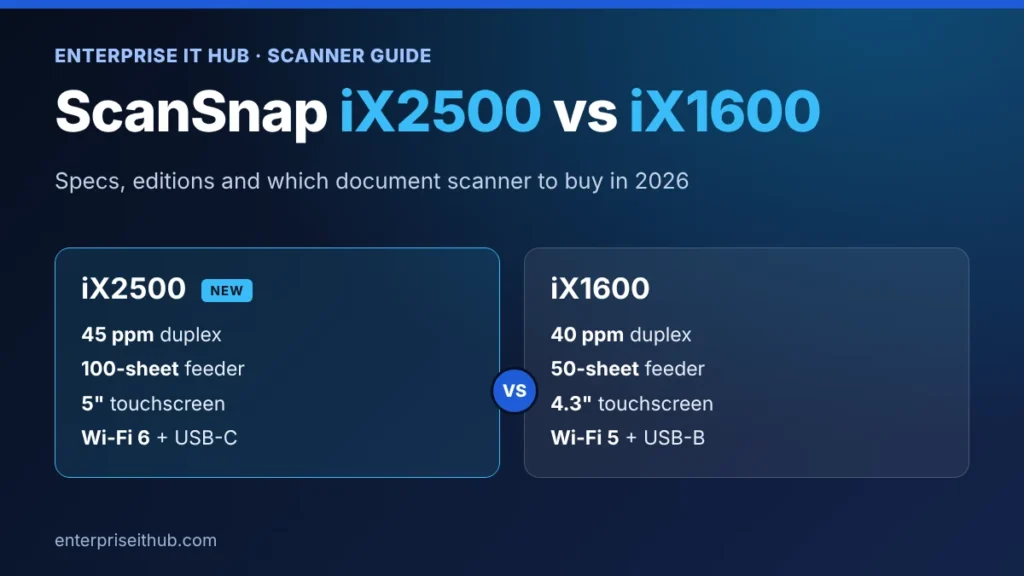
- Buy the ScanSnap iX2500 if you scan large batches, share the scanner with a team, or want the newest connectivity. It is faster (45 ppm vs 40 ppm), holds twice as much paper (100 vs 50 sheets), and adds a 5-inch touchscreen, Wi-Fi 6 with WPA3 and a USB Type-C port.
- The ScanSnap iX1600 is still a very capable scanner for one or two people who scan receipts, invoices and letters in smaller stacks, especially in its QuickBooks-ready Receipt Edition.
- For most offices buying new in 2026, the iX2500 is the better long-term choice. Pick the edition by job: Receipt for bookkeeping, Photo for photo archives, Premium for 4-year warranty cover.
ScanSnap iX2500 vs iX1600: specs side by side
Both scanners use the same compact body and the same ScanSnap Home software. The differences are in speed, capacity, screen and connectivity.
| Feature | ScanSnap iX2500 | ScanSnap iX1600 |
|---|---|---|
| Released | 2025 | 2021 |
| Duplex speed (A4, color) | 45 ppm / 90 ipm | 40 ppm / 80 ipm |
| Automatic document feeder | 100 sheets | 50 sheets |
| Touchscreen | 5-inch color IPS | 4.3-inch color |
| Wi-Fi | Wi-Fi 6 (802.11ax), 2.4 / 5 GHz, WPA3 | Wi-Fi 5 (802.11ac), 2.4 / 5 GHz |
| USB | USB 3.2 Gen 1, Type-C | USB 3.2 Gen 1, Type-B |
| Multi-feed detection | Ultrasonic overlap + length detection | Ultrasonic overlap + length detection |
| Largest sheet (feeder) | 8.5 x 14 in (216 x 360 mm) | 8.5 x 14 in (216 x 360 mm) |
| A3 / 11 x 17 in | Yes, with carrier sheet (manual feed) | Yes, with carrier sheet (manual feed) |
| Size (W x D x H) | 11.5 x 6.3 x 6.3 in (292 x 161 x 159 mm) | 11.5 x 6.3 x 6.0 in (292 x 161 x 152 mm) |
| Weight | 7.7 lb (3.5 kg) | 7.5 lb (3.4 kg) |
| Software included | ScanSnap Home, ABBYY FineReader for ScanSnap, Kofax Power PDF Standard | ScanSnap Home, ABBYY FineReader for ScanSnap, Kofax Power PDF Standard |
What the ScanSnap iX2500 improves
1. A feeder twice as large
The biggest day-to-day upgrade is the 100-sheet automatic document feeder. On the iX1600 you reload every 50 pages; on the iX2500 you can drop in a full month of invoices or a thick contract and walk away. Combined with the jump from 40 to 45 pages per minute, large batches finish noticeably sooner.
2. A bigger screen for shared offices
The 5-inch touchscreen makes it easier for several people to use one scanner. Each person taps their own profile and destination, such as a OneDrive folder, a shared drive or QuickBooks Online, so documents land in the right place without anyone touching a computer.
3. Wi-Fi 6, WPA3 and USB-C
The iX2500 moves to Wi-Fi 6 and supports WPA3 plus enterprise (EAP) Wi-Fi security, which matters if your IT policy requires modern wireless encryption. It also swaps the older USB Type-B port for USB Type-C, so it connects to current laptops without an adapter.
What stays the same
- Same footprint: both are 11.5 inches wide and fit on a normal desk.
- Same software: ScanSnap Home on Windows, Mac, iPhone and Android, with searchable PDFs, automatic document sorting and direct scanning to cloud services.
- Same paper handling: letter and legal sheets in the feeder, A3 and 11 x 17 in with a carrier sheet, plus business cards, receipts and plastic cards.
- Same reliability features: ultrasonic multi-feed detection stops the scan if two pages go through together.
ScanSnap editions explained: Standard, Receipt, Photo and Premium
Ricoh sells the same scanner hardware in several bundles. The editions differ in software setup, accessories and warranty, not in scan speed.
| Edition | What you get | Best for |
|---|---|---|
| ScanSnap iX2500 (Standard) PA03860-B005 | The scanner with ScanSnap Home, ABBYY FineReader and Kofax Power PDF | General office paperwork, contracts, HR and client files |
| ScanSnap iX2500 Receipt Edition PA03860-B305 | Preconfigured QuickBooks Online profile with receipt and invoice data extraction | Bookkeepers, accountants and small business owners who use QuickBooks Online |
| ScanSnap iX2500 Photo Edition CG01000-399204 | Photo-focused bundle with 3 photo carrier sheets, auto face orientation and red-eye reduction | Families, photographers and anyone digitizing boxes of prints |
| ScanSnap iX2500 Premium Edition CG01000-310324 | The scanner plus a 4-year depot warranty (mail-in repair) | Offices that scan every day and want long-term cover |
| ScanSnap iX1600 Receipt Edition PA03770-B675 | iX1600 with a QuickBooks Online profile and a receipt guide in the feeder | Lighter receipt and invoice workloads |
Compare current prices and stock across every model in our ScanSnap and document scanner collection.
Which ScanSnap should you buy?
Choose the iX2500 if you…
- scan more than 50 pages at a time, or scan every day;
- share one scanner between several people or departments;
- need WPA3 or enterprise Wi-Fi security on your office network;
- want the newest model that will stay supported the longest.
Choose the iX1600 if you…
- are one person scanning receipts, bills and letters in small stacks;
- already know and like the iX1600 workflow;
- don’t need Wi-Fi 6 or a 100-sheet feeder.
Our pick by use case
- Accountants and bookkeepers: ScanSnap iX2500 Receipt Edition for QuickBooks Online.
- Busy shared office: ScanSnap iX2500 Premium Edition with 4-year warranty.
- Photo archives: ScanSnap iX2500 Photo Edition.
- Everyday paperwork: ScanSnap iX2500 document scanner.
Buying checklist before you order
- Count your pages. Estimate how many sheets you scan in a typical batch. Over 50 points to the iX2500.
- Check where files must go. Confirm your cloud service or accounting app is supported by ScanSnap Home.
- Check your network. If your Wi-Fi requires WPA3 or 802.1X (EAP), choose the iX2500.
- Pick the edition by job, not by price alone: Receipt, Photo or Premium only add value if you use what they include.
- Buy new and sealed. A brand-new unit includes the full manufacturer warranty and all bundled software licenses.
Buying several scanners for an office, school or agency? Request a volume quote for ScanSnap scanners and our team will reply with pricing, usually within 4 business hours.
Frequently asked questions
Is the ScanSnap iX2500 worth upgrading to from the iX1600?
If your iX1600 works well and you scan small batches, there is no urgent reason to upgrade. The iX2500 is worth it if you regularly scan more than 50 pages at once, share the scanner with a team, or need Wi-Fi 6 and WPA3 security.
How fast is the ScanSnap iX2500?
The iX2500 scans 45 pages per minute, or 90 images per minute when scanning both sides, compared with 40 pages (80 images) per minute on the iX1600.
Does the ScanSnap iX2500 work with QuickBooks Online?
Yes. The Receipt Edition comes with a preconfigured QuickBooks Online profile that extracts the vendor, date and amount from receipts and invoices. A QuickBooks Online subscription is required and sold separately.
Can the ScanSnap iX2500 scan photos?
Yes. Every iX2500 can scan photos, and the Photo Edition adds carrier sheets for fragile prints plus automatic face orientation and red-eye reduction.
Does the ScanSnap work with Mac and iPhone?
Yes. ScanSnap Home runs on Windows and macOS, and the mobile app supports iPhone, iPad and Android, so you can scan straight to your phone over Wi-Fi.
Can I scan A3 or 11 x 17 documents?
Both models scan up to 8.5 x 14 inches through the feeder. Larger A3 and 11 x 17 inch pages can be scanned with a carrier sheet using manual feed.
The bottom line
The ScanSnap iX1600 is still a reliable receipt and document scanner, but the ScanSnap iX2500 is the better buy for most offices in 2026 thanks to its 100-sheet feeder, faster scanning, larger screen and modern Wi-Fi 6 and USB-C connectivity. Choose the edition that matches your work, and every unit we ship is brand-new, factory sealed and covered by the full manufacturer warranty. Shop ScanSnap document scanners or ask our team which model fits your office.

The Enterprise IT Hub team writes practical guides on enterprise storage, projectors, label printing and IT infrastructure.