ScanSnap iX2500 Editions Compared: Standard vs Premium vs Receipt vs Photo

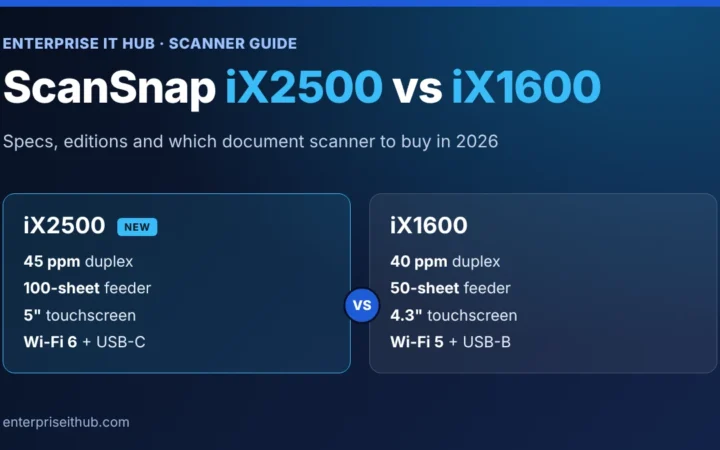
Quick answer: Every ScanSnap iX2500 edition uses the same flagship scanner: 45 ppm duplex scanning, a 100-sheet feeder, a 5-inch touchscreen and Wi-Fi 6. The editions differ in what’s bundled. The Standard edition is the best value for general scanning. Premium adds a 4-year depot warranty. Receipt adds receipt and invoice capture for QuickBooks Online. Photo adds photo carrier sheets for scanning prints.

Edition comparison
| Edition | What it adds | Best for | Price |
|---|---|---|---|
| iX2500 Standard | The core scanner | Most offices and home offices | $493.99 |
| iX2500 Premium | 4-year depot warranty | Busy offices that want long coverage | $518.99 |
| iX2500 Receipt | Receipt and invoice data extraction into QuickBooks Online; includes Kofax Power PDF Standard | Bookkeepers, accountants, expense-heavy businesses | $545.99 |
| iX2500 Photo | 3 photo carrier sheets, auto orientation and red-eye reduction | Families and archivists digitizing photo prints | $617.49 |
Prices as listed at the time of writing and may change.
Which edition should you buy?
- General office paperwork: Standard. Same speed and features for the least money.
- You want peace of mind: Premium, for the longer depot warranty.
- Receipts and invoices into QuickBooks: Receipt edition. It saves manual data entry every month.
- Boxes of family photos: Photo edition, with carrier sheets to protect prints.
iX2500 vs iX1600
The iX2500 is the newer flagship, with a larger feeder and faster speed. The iX1600 still suits lighter daily scanning. See the full comparison: ScanSnap iX2500 vs iX1600.
Frequently asked questions
What is the difference between ScanSnap iX2500 editions?
They share the same scanner. The Premium edition adds a 4-year depot warranty, the Receipt edition adds QuickBooks receipt and invoice extraction, and the Photo edition adds photo carrier sheets.
Is the ScanSnap iX2500 Receipt edition worth it?
If you process many receipts and invoices into QuickBooks Online, yes. It cuts manual data entry.
How fast is the ScanSnap iX2500?
It scans up to 45 pages per minute, double-sided, with a 100-sheet automatic feeder.
Does the iX2500 have Wi-Fi?
Yes. It supports Wi-Fi 6 and scans to PC, Mac, mobile and cloud.
Can the ScanSnap iX2500 scan photos?
Yes. The Photo edition adds carrier sheets designed for photo prints.
Which ScanSnap is best for a small business?
The iX2500 Standard is the best value for most small businesses; choose Receipt if bookkeeping is the main use.
The bottom line
Buy the Standard iX2500 unless a bundle solves a specific need. See all document scanners.
Enterprise IT Hub ships across the US with free shipping on orders over $50, a tracking number on every order and 30-day hassle-free returns. See our shipping policy.

The Enterprise IT Hub team writes practical guides on enterprise storage, projectors, label printing and IT infrastructure.