


Description
HP 936 Ink Cartridges – Quick Answer
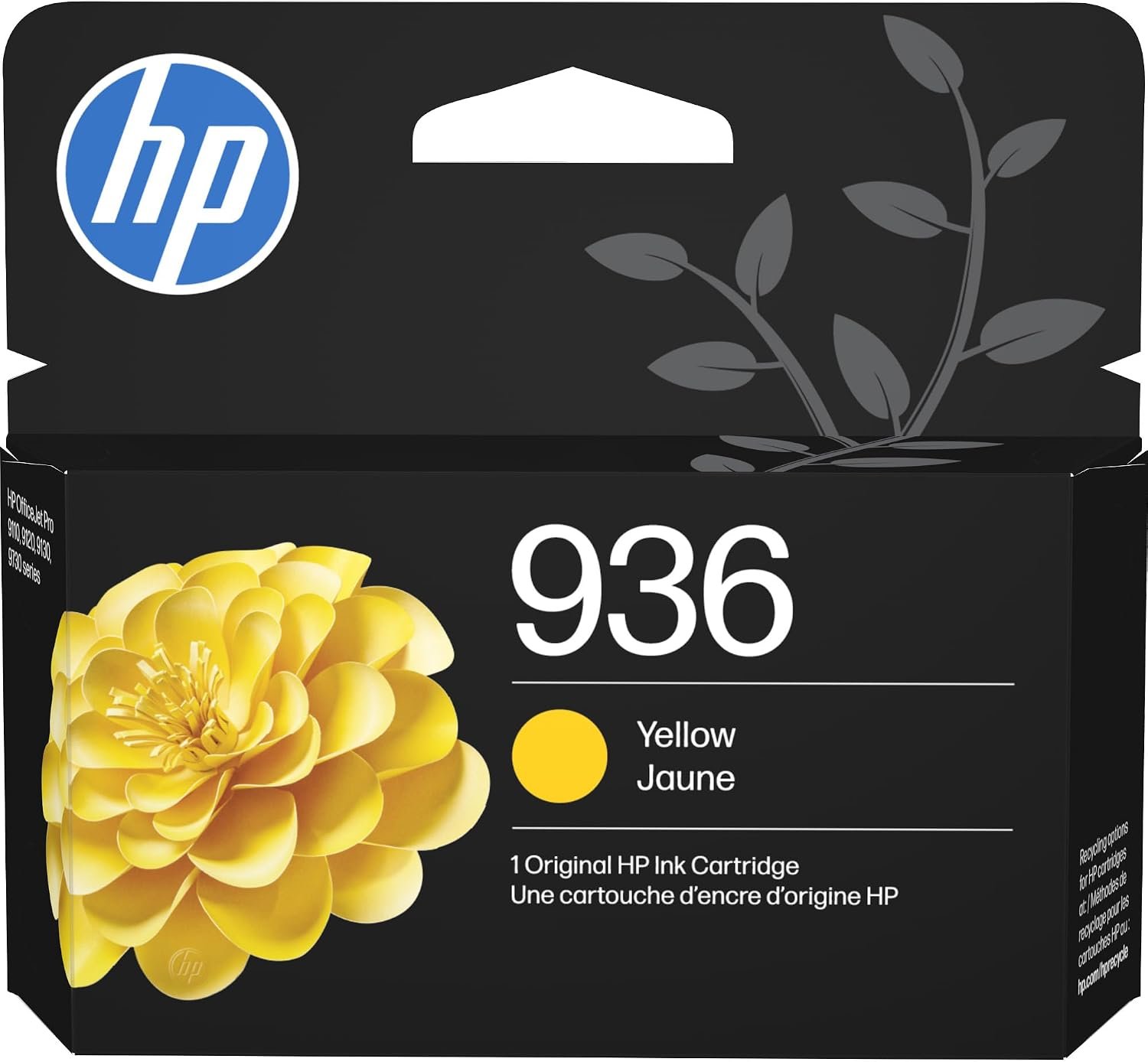
HP 936 is the genuine standard-yield ink cartridge series for the HP OfficeJet Pro 9110, 9120, 9130 and 9720/9730 printer families, including HP+ “e” models. It comes in four colors: Black (4S6V2LN), which prints about 1,250 pages, and Cyan (4S6U9LN), Magenta (4S6V0LN) and Yellow (4S6V1LN), which each print about 800 pages.
HP 936 Part Numbers by Color
| Color | HP Part Number | UPC | Page Yield |
|---|---|---|---|
| Black | 4S6V2LN | 196548610884 | ~1,250 pages |
| Cyan | 4S6U9LN | 196548610853 | ~800 pages |
| Magenta | 4S6V0LN | 196548610860 | ~800 pages |
| Yellow | 4S6V1LN | 196548610877 | ~800 pages |
Page yields are approximate, based on ISO/IEC testing at 5% coverage.
Why Choose Original HP 936 Ink?
Original HP ink and your OfficeJet Pro printer are engineered to work as one system. You get accurate ink-level readings, consistent color and no “cartridge not recognized” errors after firmware updates.
- HP+ compatible: Third-party 936 cartridges are blocked on HP+ activated printers. Original HP ink always works.
- Sharp black text: Pigment-based black ink resists smudging on business documents.
- Vivid, consistent color: Ideal for charts, invoices, flyers and color-coded reports.
- Protects your print head: Genuine ink reduces clogging and printer downtime.
- Easy recycling: Return empties free through HP Planet Partners.
Compatible Printers
HP OfficeJet Pro 9100 Series
- HP OfficeJet Pro 9110 / 9110b
- HP OfficeJet Pro 9117b
- HP OfficeJet Pro 9120 / 9120b / 9120e
- HP OfficeJet 9122e
- HP OfficeJet Pro 9125e / 9128e
- HP OfficeJet Pro 9130 / 9130b / 9130e
- HP OfficeJet Pro 9135e
HP OfficeJet Pro Wide Format 9700 Series
- HP OfficeJet Pro 9720 / 9720e
- HP OfficeJet Pro 9730 / 9730e Wide Format
Single Cartridge or Bulk Pack?
- 1 Cartridge: Replace only the color that is running low.
- 3 Cartridges: Keep spares on hand and save on cost per cartridge.
- 24 Cartridges: Best value for offices, schools and IT departments managing multiple printers.
Need all colors at once? Get the HP 936 4-Pack Black, Cyan, Magenta, Yellow (6C3Z5LN) or the HP 936 Tri-Color 3-Pack (6C3Z3LN).
HP 936 vs HP 936e: Which Should You Buy?
Standard HP 936 cartridges cost less upfront and suit light to moderate printing. If your office prints in color every day, the HP 936e EvoMore high-yield ink cartridges deliver roughly double the pages and a lower cost per page.
Technical Specifications
| Specification | Details |
|---|---|
| Brand | HP (Original) |
| Series | HP 936 Standard Yield |
| Colors | Black, Cyan, Magenta, Yellow |
| Page Yield | Black ~1,250 pages; Color ~800 pages each |
| Print Technology | HP Thermal Inkjet |
| Ink Type | Pigment-based |
| Pack Options | 1, 3 or 24 cartridges |
| Storage Temperature | 0–40 °C |
| Operating Humidity | 5–80% RH |
| Condition | New, factory sealed |
How to Install an HP 936 Ink Cartridge
- Turn on the printer and open the cartridge access door.
- Wait for the carriage to stop, then press the empty cartridge to release it.
- Unpack the new HP 936 cartridge.
- Slide it into the matching color slot until it clicks.
- Close the door and run an alignment if prompted.
Explore more genuine HP ink cartridges for your office printers.
Reviews
There are no reviews yet.