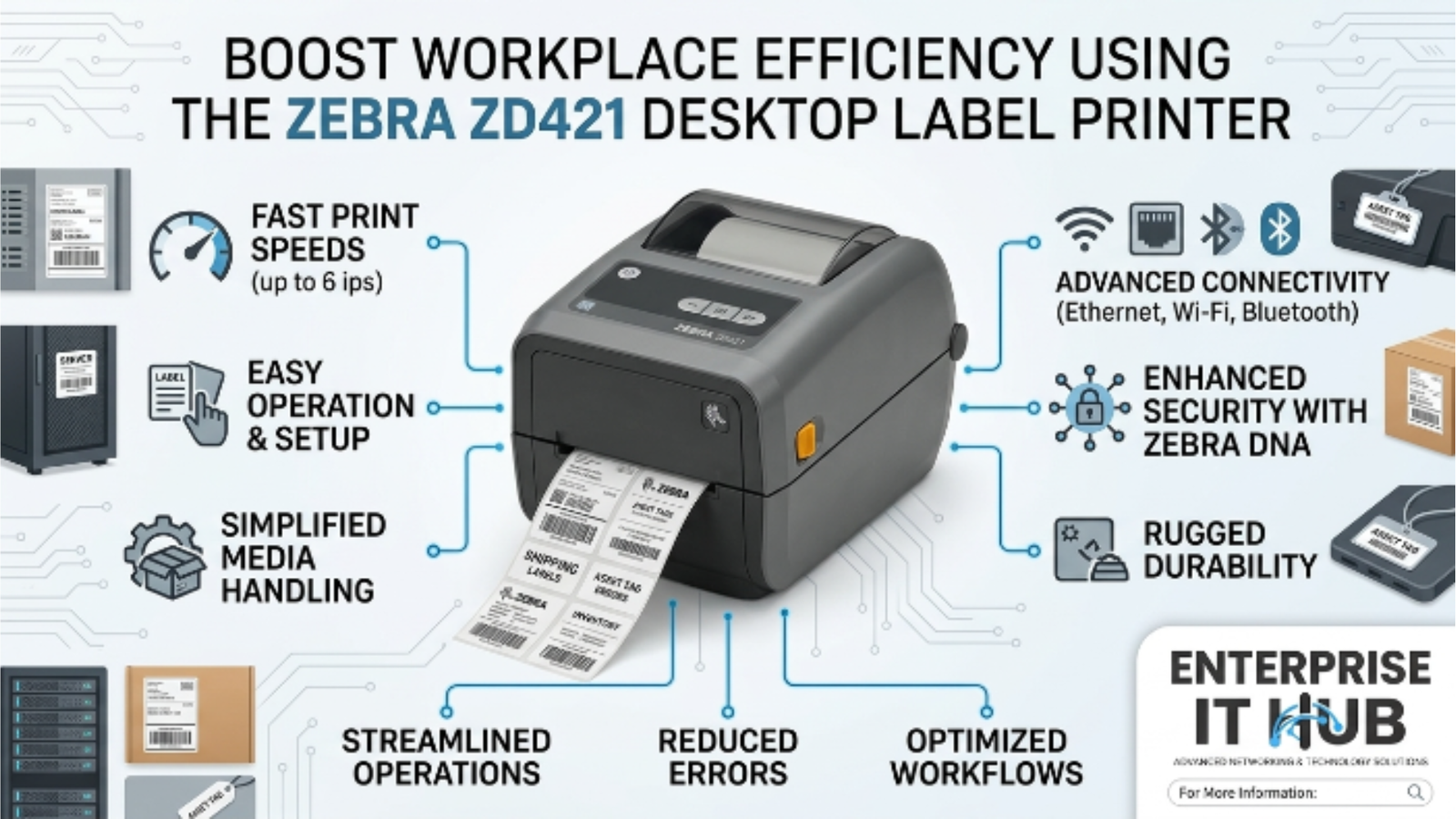
Boost Workplace Efficiency Using the Zebra ZD421 Desktop Label Printer
The Zebra ZD421 Desktop Label Printer is redefining how modern businesses handle labeling — fast, compact, and built for the real world.
Labeling bottlenecks kill productivity. A slow printer, a jammed ribbon, a clunky driver install — any one of these can turn a simple task into a 30-minute headache. If your team is still wrestling with outdated thermal printers or inkjet workarounds, you’re leaving efficiency on the table.
The Zebra ZD421 Desktop Label Printer changes that equation. It’s a compact, no-nonsense direct thermal label printer engineered for environments where accuracy and speed matter — retail POS counters, healthcare stations, light warehousing, and busy office mail rooms.
In this guide, you’ll learn exactly why the ZD421 earns a permanent spot on the desks of IT buyers, operations managers, and small business owners across the US, UK, Canada, and Australia.
Table of Contents
Why Desktop Label Printing Matters in 2026
Label printing isn’t a back-office afterthought anymore. It’s a front-line operational tool.
From hospital wristbands to warehouse pick tickets, from retail shelf tags to pharmacy prescription labels — the volume and accuracy demands on desktop label printers have never been higher. According to industry research, the global barcode printer market is projected to surpass $5 billion by 2027, driven by supply chain digitization and expanding compliance requirements.
⚠️ ALERT: Businesses that rely on manual handwriting or inkjet printers for labeling face up to 3x higher error rates in shipping, inventory, and compliance documentation compared to thermal label printing environments.
The shift is real. Teams that invest in purpose-built label printing hardware see measurable reductions in mis-picks, return rates, and compliance failures. The Zebra ZD421 Desktop Label Printer sits squarely in this growth category — and it’s priced to make the upgrade decision easy.
What Makes the Zebra ZD421 Desktop Label Printer Stand Out
Let’s cut to what matters. Most desktop label printers are either too limited for business use or overbuilt and overpriced for anything under an enterprise-scale operation. The Zebra ZD421 Desktop Label Printer hits the sweet spot.
Here’s what separates it from the pack:
┌──────────────────────────────────────────────┐
│         ZEBRA ZD421 — CORE ADVANTAGES         │
├──────────────────────────────────────────────┤
│  ✔ Direct Thermal — no ribbon, no mess       │
│  ✔ Compact footprint — fits any desk         │
│  ✔ Easy media loading — drop-in design       │
│  ✔ ZPL II compatible — works with any WMS    │
│  ✔ USB connectivity — plug and print         │
│  ✔ 203 dpi resolution — sharp, scannable     │
│  ✔ Up to 4" print width — versatile media    │
└──────────────────────────────────────────────┘
The drop-in media loading alone saves time. No threading, no aligning, no wrestling with rolls. Open the cover, drop in the label roll, close it — done. For high-turnover environments like retail POS and shipping desks, this matters more than most people realize until they’ve burned 20 minutes reloading a finicky competitor unit.
🔴 KEY POINT: ZPL II (Zebra Programming Language II) compatibility means the ZD421 integrates directly with virtually every major warehouse management system (WMS), point-of-sale platform, and ERP on the market — with zero custom middleware.
The ZD421 also holds its own on durability. Zebra builds these units to withstand 8+ hours of daily operation in environments that range from climate-controlled offices to noisy, dusty warehouse floors.
Key Specifications You Need to Know
Don’t buy a printer without knowing the spec sheet cold. Here’s what the Zebra ZD421 Desktop Label Printer delivers:
| Specification | Detail |
|---|---|
| Print Method | Direct Thermal |
| Resolution | 203 dpi |
| Print Width | Up to 4 inches |
| Connectivity | USB |
| Language Support | ZPL II |
| Media Loading | Easy drop-in design |
| Ideal Environments | Healthcare, Retail POS, Light Warehousing, Office |
| Price | $462.00 |
The 203 dpi resolution is the industry standard for barcode labels. It produces sharp, scannable codes that hold up across 1D barcodes (Code 128, UPC), 2D barcodes (QR, DataMatrix), and plain-text labels. If you need higher resolution for very small labels or fine-print pharmaceutical applications, the 300 dpi tier exists — but for the overwhelming majority of use cases, 203 dpi is exactly right.
⚠️ PRO TIP: Direct thermal printing eliminates ribbon costs entirely. No ink, no toner, no ribbon cartridges. If your labeling volume is under 1,000 labels per day and your labels won’t face extreme heat or prolonged UV exposure, direct thermal is the smarter economic choice.
For reference, if you need thermal transfer capability — for labels that must withstand harsh environments, outdoor conditions, or chemical exposure — the Zebra GK420t at $352.00 supports both thermal transfer and direct thermal printing with USB and Ethernet connectivity. But for standard office and light-duty environments, the ZD421’s direct thermal approach is cleaner and cheaper to run.
Top Use Cases for the Zebra ZD421 Desktop Label Printer
The Zebra ZD421 Desktop Label Printer isn’t a one-trick device. Here are the environments where it genuinely earns its keep:
Healthcare Patient wristbands, specimen labels, medication bins, asset tags. Accuracy isn’t optional — it’s a liability issue. The ZD421’s ZPL II compatibility means it integrates with major EMR and lab information systems out of the box.
Retail Point of Sale Price tags, shelf labels, promotional stickers, SKU labels. The compact footprint means it fits on a crowded checkout counter without displacing POS terminals or card readers.
Light Warehousing and Fulfillment Shipping labels, pick tickets, receiving tags, return labels. At $462.00, you can equip multiple picking stations without blowing your hardware budget.
Office and Administrative File folder labels, asset inventory tags, mail room shipping labels. Any office that handles regular shipments or physical asset tracking benefits immediately.
Education and Healthcare Facilities Equipment tagging, library assets, student materials. Facilities with large inventories of labeled assets benefit from the ZD421’s simple operation — minimal training required.
According to PCMag’s thermal printer review coverage , Zebra’s ZD-series printers consistently rank among the most reliable desktop label solutions for SMB environments.
ZD421 vs. Traditional Inkjet Label Printing
Still printing labels from a standard inkjet? Here’s the honest comparison:
| Factor | Zebra ZD421 (Direct Thermal) | Standard Inkjet Printer |
|---|---|---|
| Per-label cost | Low (thermal media only) | High (ink + label stock) |
| Print speed | Fast, consistent | Slow, variable |
| Label durability | Excellent for indoor use | Poor — smears, fades |
| Setup complexity | Plug in, install driver, print | Driver + software + calibration |
| Jam frequency | Very low | High with label sheets |
| Barcode scannability | Excellent | Inconsistent |
| Footprint | Compact, dedicated | Shared, bulky |
| Total cost of ownership | Lower over 12 months | Higher |
The math is clear. An inkjet printer might have a lower upfront cost, but the ongoing ink and label sheet costs, plus wasted time on jams and print quality issues, make it the more expensive option within months.
The Zebra ZD421 Desktop Label Printer is built for one job and does it without complaint, day after day.
Setup and Software Integration
Getting the Zebra ZD421 Desktop Label Printer up and running is genuinely fast. Here’s the typical deployment flow:
- Unbox and place — the compact footprint means it fits almost anywhere
- Load media — drop-in label roll design, no threading required
- Connect via USB — plug directly into your PC or label printing workstation
- Install Zebra Setup Utilities — free from Zebra’s website, handles driver install and calibration
- Configure in your software — ZPL II compatibility means direct integration with most WMS, POS, and ERP platforms
- Print a test label — verify alignment and dpi settings
- Deploy to users — minimal training required
For more complex deployments, Zebra’s ZebraDesigner label design software offers drag-and-drop label templates that non-technical staff can operate immediately. You can also find in-depth labeling workflow guidance at LabelingSolutions.com.
⚠️ PRO TIP: If you’re managing multiple ZD421 units across locations, Zebra’s Print DNA suite provides centralized fleet management — including remote configuration, firmware updates, and usage analytics — at no additional software cost.
The Zebra ZD421 Desktop Label Printer ships ZPL II ready. That means zero custom scripting, zero middleware layer, and zero vendor lock-in. Your existing label templates work on day one.
How to Choose the Right Desktop Label Printer
Not every labeling environment needs the same solution. Here’s a step-by-step buying guide:
- Define your volume. Under 500 labels/day? Direct thermal is ideal. Over 2,000 labels/day with harsh storage requirements? Consider thermal transfer.
- Check your media requirements. Standard paper labels for indoor use → direct thermal. Chemical-resistant, outdoor, or long-life labels → thermal transfer (see the Zebra GK420t).
- Map your connectivity needs. USB-only operation fits most desktop deployments. If you need network printing, verify Ethernet or Wi-Fi availability in the model you select.
- Verify software compatibility. ZPL II is the universal standard. If your WMS or POS supports ZPL II, you’re set. The ZD421 covers this natively.
- Set your print width requirements. Standard shipping labels and retail tags fit within 4 inches — the ZD421’s maximum print width. Wider label applications need a wider-format unit.
- Consider total cost of ownership. Factor in media costs, not just hardware cost. Direct thermal eliminates ribbon spend.
- Evaluate support and warranty. Zebra provides strong enterprise-grade support, firmware updates, and a well-documented developer SDK.
✅ Quick Reference Checklist
Use this before purchasing or deploying your Zebra ZD421 Desktop Label Printer:
PRE-PURCHASE
[ ] Confirmed daily label volume is compatible with direct thermal
[ ] Verified labels will be used indoors / normal temperature range
[ ] Confirmed USB connectivity meets deployment requirements
[ ] Checked WMS / POS / ERP compatibility with ZPL II
[ ] Compared total cost of ownership vs. current solution

DEPLOYMENT
[ ] Installed Zebra Setup Utilities on host PC
[ ] Loaded label media using drop-in tray
[ ] Ran calibration print to confirm alignment
[ ] Tested barcode scannability with handheld scanner
[ ] Configured label template in your label design software

ONGOING OPERATIONS
[ ] Scheduled periodic printhead cleaning
[ ] Stocked spare label rolls at each station
[ ] Registered unit with Zebra for warranty and firmware updates
[ ] Documented printer IP / asset tag in IT inventory
[ ] Trained staff on media reload procedure
Frequently Asked Questions
Q: Is the Zebra ZD421 compatible with Mac operating systems? A: Yes. Zebra provides driver support for macOS in addition to Windows. ZPL II-based printing also works through network-based print queues on Mac environments.
Q: What label sizes does the Zebra ZD421 support? A: The ZD421 supports label widths from 0.585 inches up to 4 inches, with label lengths adjustable in software. This covers standard shipping labels (4″ x 6″), address labels, barcode tags, and most retail shelf formats.
Q: Does the ZD421 require ink or ribbons? A: No. It uses direct thermal technology — heat activates the thermal coating on the label media directly. No ink cartridges, no toner, no ribbons. This reduces supply costs and eliminates mid-shift ribbon changes.
Q: How does the ZD421 differ from the Zebra GK420t? A: The GK420t supports both direct thermal and thermal transfer printing, includes Ethernet in addition to USB, and is priced at $352.00. It’s the better choice for environments needing network connectivity or durable chemical-resistant labels. The ZD421 at $462.00 is the more modern unit with a compact form factor, easier media loading, and updated firmware — ideal for desktop-first deployments in healthcare and retail.
Q: What is the print speed of the Zebra ZD421? A: Zebra rates the ZD421 for professional desktop labeling environments. For precise IPS (inches per second) specifications relevant to your use case, consult Zebra’s official spec sheet or contact the sales team at enterpriseithub.com for guidance.
Conclusion
The Zebra ZD421 Desktop Label Printer isn’t a luxury purchase — it’s an operational upgrade that pays for itself fast. At $462.00, it delivers direct thermal printing, ZPL II compatibility, drop-in media loading, and the reliability that Zebra has built its reputation on.
If you’re running a retail store, healthcare facility, warehouse picking station, or a busy office mail room, the ZD421 eliminates the friction that slows your team down. No ribbons, no jams, no compatibility headaches. Just sharp, accurate labels, every time.
For environments that need thermal transfer capability or network connectivity, the Zebra GK420t at $352.00 is the companion option — USB and Ethernet, dual print mode, and the same ZPL/EPL language support.
Ready to upgrade your labeling workflow? The Zebra ZD421 Desktop Label Printer is available now at enterpriseithub.com — the go-to source for business-grade printers, storage, and projectors.